
When someone searches for a plumber, a builder or an accountant near them, the map results usually appear before any website. Your Google Business Profile is what decides whether you show up there, and whether the person picks you or the business next to you.
Google says local results are based on three things: how well your profile matches the search, how far you are from the person searching, and how well known your business is, which includes your reviews (Google Business Profile Help). You cannot pay for a better position, but you can control most of what Google looks at. These are the nine steps we work through for our own clients.
You can do all of this yourself with the steps below. If you would rather it was handled for you, our Google Business Profile management service covers every step and keeps your profile active each month.

1. Claim and Verify Your Profile
Search for your business on Google Business Profile and claim it, or create a new one if it does not exist yet. Google then asks you to verify that you run the business. Depending on your business, it offers a phone call or text, an email, a live video call or a postcard, and it chooses which of these you can use (Google Business Profile Help). An unverified profile rarely ranks, so this comes first.
2. Use Your Real Business Name
Enter your business name exactly as it appears on your signage and paperwork. Adding extra words such as “Best Plumber Penrith” goes against Google’s guidelines and can get your profile suspended, and a suspended profile disappears from the map until it is fixed.
3. Choose the Right Categories
Your primary category has more effect on where you appear than almost anything else you can set. Pick the one that describes your main service as closely as possible, then add secondary categories for the other work you do. A builder might choose “Builder” as the primary category and add “Home builder” and “Construction company” if they fit.
4. Add Your Services and a Clear Description
List each service you offer, in the words your customers use. Then write a short description of what you do, who you do it for and where you work. Google gives you up to 750 characters, which is plenty for three or four clear sentences.
5. Set Your Address or Service Areas
If customers come to you, show your address. If you travel to your customers, as most trades do, hide the address and add the suburbs and towns you cover as service areas instead. Your details should match what is on your website, word for word, so Google can be confident it is the same business.
6. Link to the Right Page on Your Website
The website link on your profile should go to the page that matches what people are looking for, usually your home page or a location page. Adding tracking to the link lets you see in Google Analytics how many visits and enquiries come from your profile. Your profile and your website work together, so a website with a clear page for each service makes your profile stronger too.
7. Add Real Photos
Upload photos of your actual work, your team, your vehicles and your premises, and add new ones as you finish jobs. Real photos build more trust than stock images, and they give people a reason to choose you over a profile with none.
8. Ask for Reviews and Reply to Every One
Reviews are one of the clearest signals Google uses, and they are often what makes someone pick up the phone. Make asking part of how you finish every job, with a short text or email containing your review link. Reply to every review, good or bad, in a calm and specific way, because future customers read your replies as much as the reviews themselves. The most common problems we see are covered in 5 Common Google Business Profile Mistakes.
9. Keep Your Profile Active
A profile that is updated regularly gives Google and customers a reason to trust that you are open and busy. Share a post about a recent job or update every week, keep your hours current over public holidays, and add new photos as you go.
What a Well-Looked-After Profile Can Do
These steps are not a one-off job, and the results build over time. Two of our clients show what that looks like.
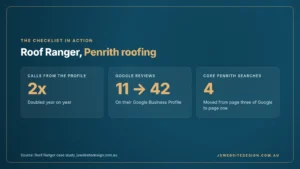
- Roof Ranger, Penrith: calls from their Google Business Profile doubled year on year, their reviews grew from 11 to 42, and four core Penrith roofing searches moved from page three to page one. Read the Roof Ranger case study.
- Schofields Accountants: calls straight from their Google Business Profile rose 48% year on year. Read the Schofields case study.
Your profile is one part of local SEO. Our local SEO checklist covers the rest, from your website to directory listings and tracking.
Frequently Asked Questions
Is a Google Business Profile free?
Yes, creating and managing a profile costs nothing. The cost is the time it takes to set it up properly and keep it active.
Can I have a profile if I do not have a shopfront?
Yes, businesses that travel to their customers, such as most trades, can hide their address and show the suburbs they cover as service areas instead.
How long does it take to see results?
Fixes such as the right category and complete details can make a difference within a few weeks. Reviews, photos and regular posts build your position over several months, which is why consistency matters more than a one-off clean-up.
How often should I post on my profile?
Once a week is a good rhythm for most local businesses. A short post about a recent job with a real photo is enough.
Does my Google Business Profile help my website rank?
They support each other. Google looks at your website when it decides how well known your business is, and your profile sends visits to your website. A clear website with a page for each service makes both work harder.
Should I pay someone to manage my profile?
If you have the time to post, reply to reviews and keep it up to date, you can do it yourself with the steps above. If you would rather it was handled for you, our Google Business Profile management starts from $500 + GST per month.
Want Someone to Look After Your Profile for You?

We set up, optimise and manage Google Business Profiles for local service businesses, including posts, photos and review replies, so your profile keeps working while you get on with the job. Book a free review and we will show you what your profile is missing.